
Today
Other apps give you the weather. GardenTrack tells you what to do about it.
Every morning you get one screen with the forecast for your yard, a heads-up when frost or heat is coming for your plants, and the day’s jobs sorted bed by bed.
Free to start. No credit card required.
Monday · 7:00 AM
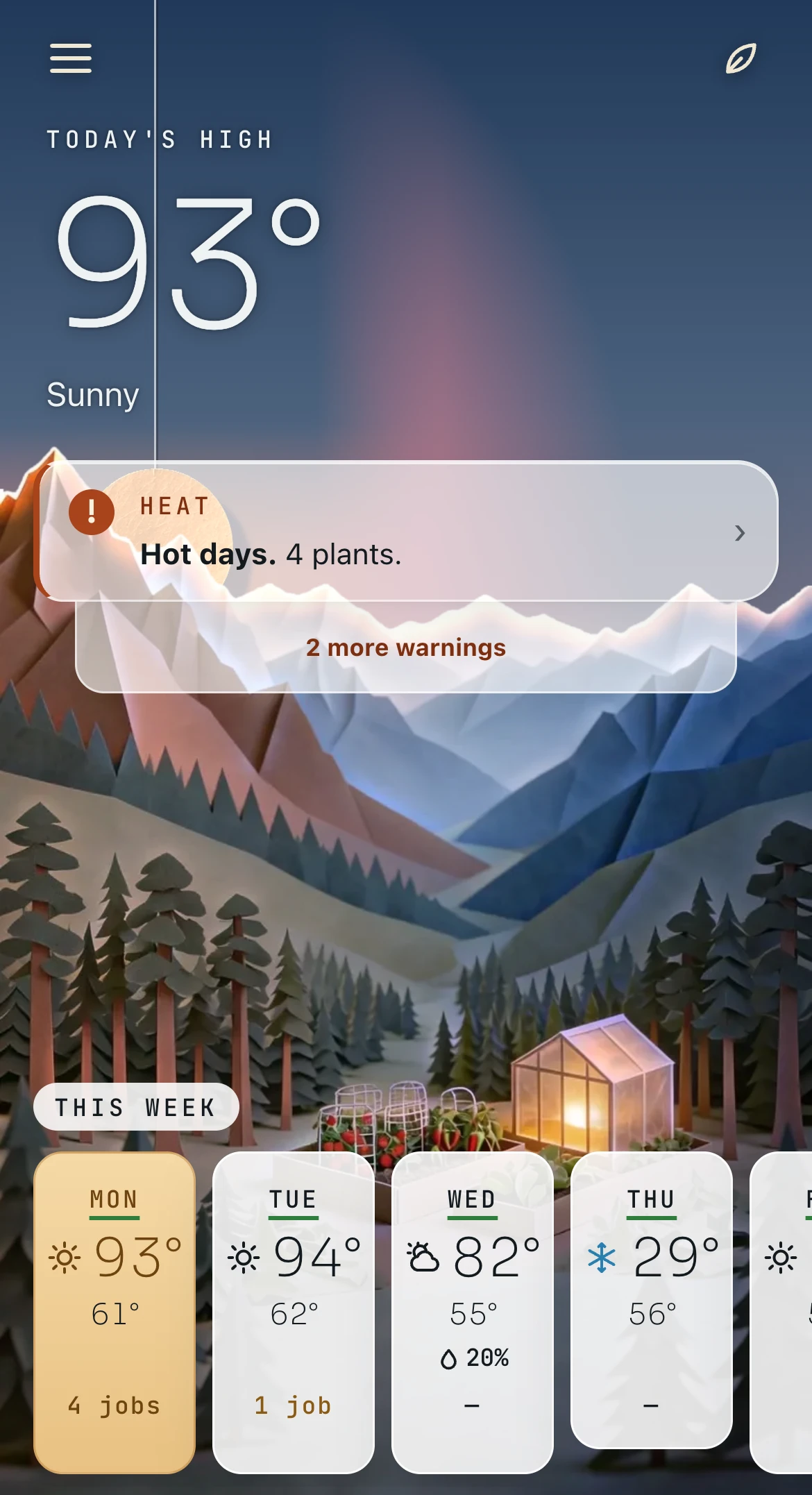
Know what kind of day it is before you head out the door.
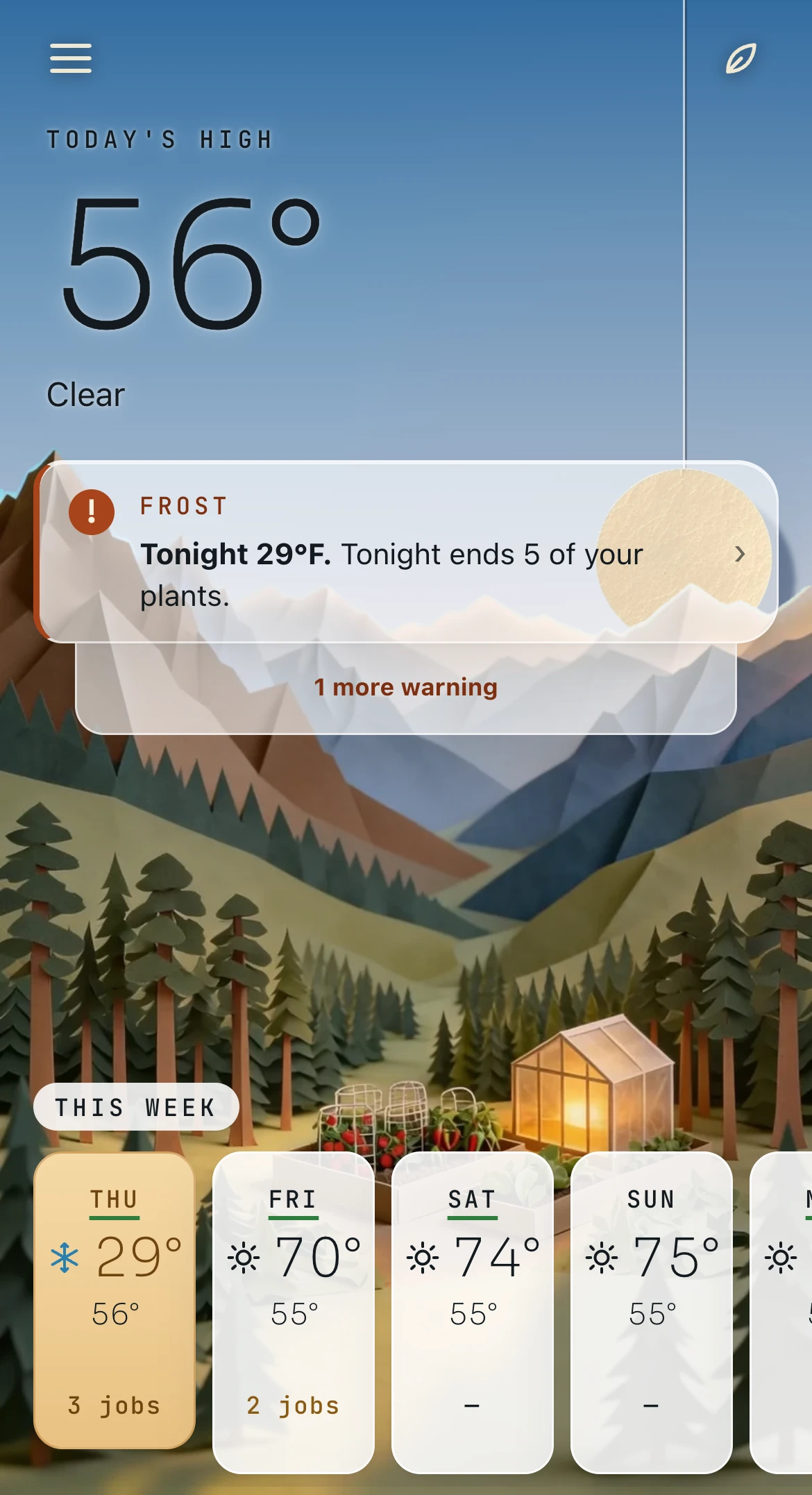
It’s going to be 93°F, so GardenTrack counts up the plants the heat will hit and shows you the rest of the week.
Thursday already has a snowflake on it, because the forecast says 29°F that night. That’s three days of warning instead of one. The picture up top is your garden’s sky, painted for the time of day and the weather, so a cloudy morning actually looks like one.
Monday · 7:00 AM
You only water on the days your garden actually needs it.
If you turn on notifications, you’ll get one at 7 AM when a spot has dried out, and it tells you which one. On the days nothing’s dry, you won’t hear a thing.
It counts the rain too, so a wet week doesn’t hand you a pile of watering. Heat, sun, pot size and soil all change how fast things dry out, which is why a basil in a small pot needs water long before a raised bed does. On Today all your watering is one row, and when you open it you just answer Still damp, Watered or It rained.

GardenTrack
Water Patio pot Dry — 2 days since water and 93° again today. Basil is the one.Monday · 7:05 AM
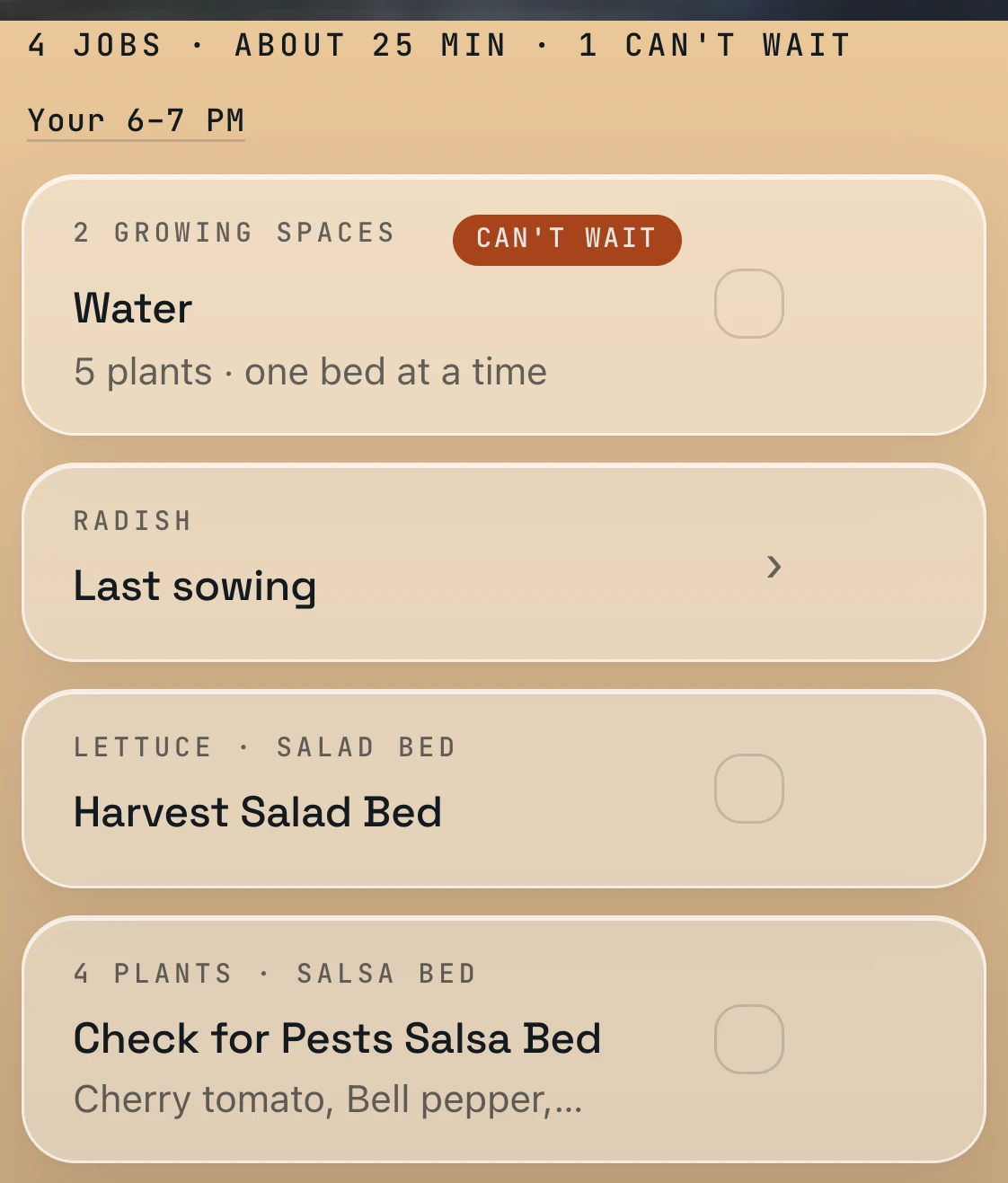
Your jobs are grouped by bed, so you’re not running back and forth across the yard.
Everything for the same bed sits together, so you can finish one bed and move on to the next.
The line at the top sums up your day: how many jobs there are, how many can’t wait, and about how long it’ll take once you’ve told GardenTrack when you garden. A job only gets a tag like Can’t wait, Last day or Dry when there’s a real reason for it. When you tick one off it moves down to Done today, and there’s an Undo in case your thumb slipped.
Monday · 7:10 AM
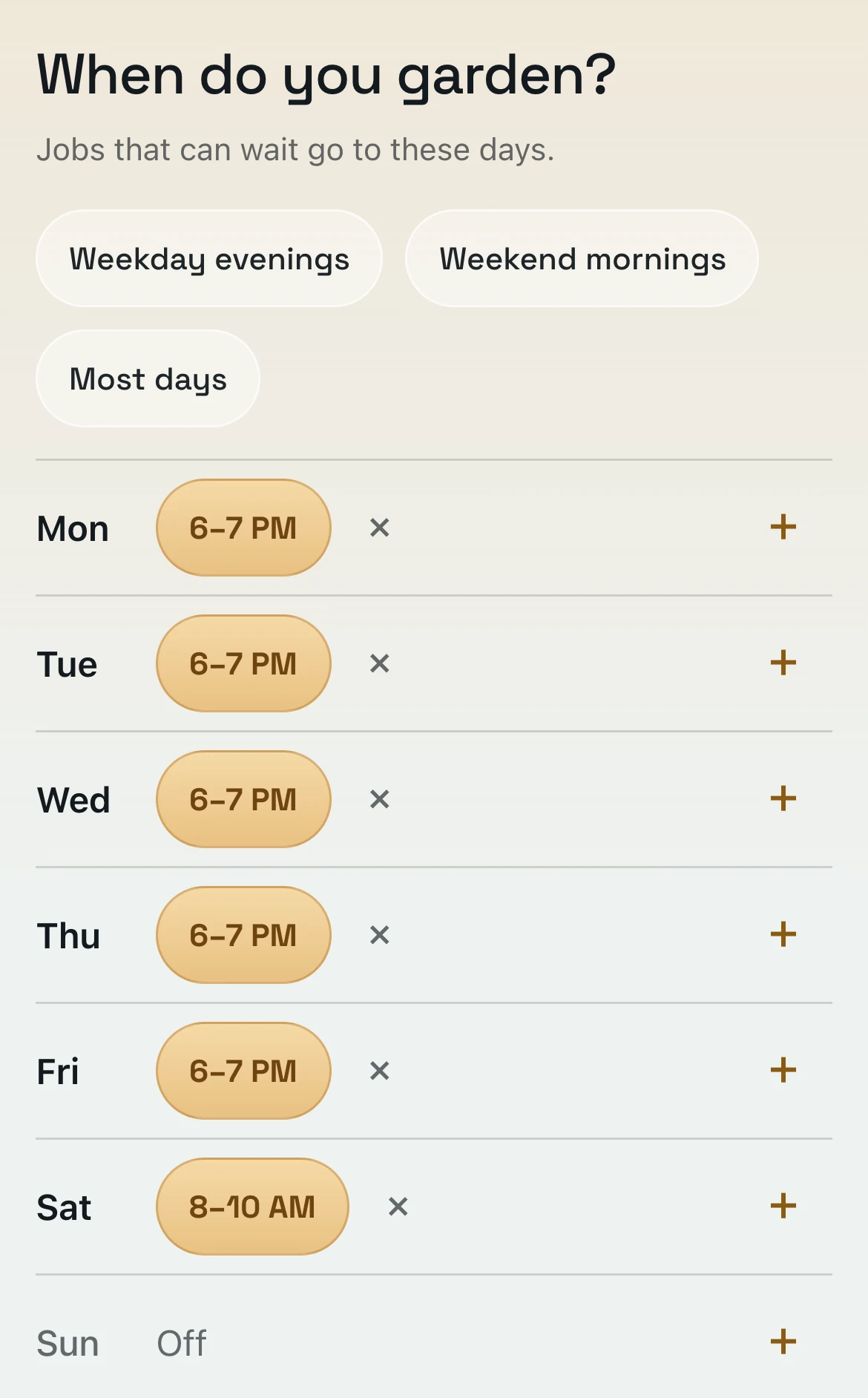
Tell GardenTrack when you garden, and it plans your week around that.
Pick your days and about how long you’ve got. Anything that can wait gets moved to one of those days, but never past the day it’s due.
Maybe that’s an hour on weekday evenings and two on Saturday morning, whatever’s true for you. When a day fills up, the jobs that can wait move ahead, and Today tells you how many went where, like 3 moved to Sat. Still too much? Open a job and tap Not today. It’ll come back tomorrow, or you can move it to this weekend or a day you pick.
Thursday · 6:00 PM
When frost is coming tonight, GardenTrack tells you what to cover.
If notifications are on, you’ll get one at 6 PM saying it’s going down to 29°F tonight, how many of your plants won’t make it, and the first few by name.
Hardy crops like kale and garlic stay off the list unless it gets cold enough to hurt them, so you only cover what needs it. Open the warning and answer with one tap: Covered them, Picked what was on them, or Leaving them. A hot spell gets the same kind of 6 PM warning, the evening before it starts.
GardenTrack
29°F tonight Frost will end Sungold, Cherry tomato and 3 more. Cover them or pick what is on them.Tonight 29°F Now
Tonight ends 5 of your plants
Sungold, Cherry tomato, Bell pepper and 2 more. Cover them, or pick what is on them.
Why this? Covered them Picked what was on them Leaving themSaturday · 8:00 AM
Out in the yard, it shows you one job at a time.
Garden mode puts one job on the screen in type you can read at arm’s length, with buttons big enough for muddy thumbs.
Open it from the menu and it walks you through the day’s jobs in order, and it keeps your screen from going to sleep while you work. Answer one, and the next one comes up. After the last one it shows you what got logged, and when nothing’s left it says That is everything for today.
In a pot · Patio pot Today
 Water pot
Basil
Why this? Still damp Watered It rainedSunday
On the days nothing needs doing, GardenTrack just says so.
It doesn’t make up busywork to look useful. When nothing’s due, Today just says Nothing needs you today.
The week strip still shows what’s coming, so a quiet Sunday won’t hide a busy Tuesday. Have the coffee anyway.

Nothing needs you today.
Questions people ask about Today.
- What app tells me what to do in my vegetable garden?
- GardenTrack does. Every morning, Today shows the forecast for your yard, a heads-up when frost or heat is coming for your plants, and the day’s jobs sorted bed by bed. A job only gets a tag like Can’t wait when there’s a real reason for it, and on the days nothing’s due it just says Nothing needs you today.
- How does it know when to water?
- It counts the rain, so a wet week doesn’t hand you a pile of watering. Heat, sun, pot size and soil all change how fast things dry out, so a basil in a small pot needs water long before a raised bed does. Turn on notifications and you get one at 7 AM when a spot has dried out, naming which one.
- Can it fit around when I actually garden?
- Yes. Pick your days and about how long you’ve got. Anything that can wait gets moved to one of those days, but never past the day it’s due, and Today tells you how many went where.
- Is it free?
- Free to start. No credit card required. Free covers 10 active plants, with Today’s jobs and the frost and heat warnings.
Everything else GardenTrack keeps track of.
- Frost and heatIt works out frost dates for your spot, warns you days ahead, and names the plants to cover on the night.
- Journal and free Season RecapIt keeps a record of your garden from year to year, and the free Season Recap lets you talk through how it went.
- Your gardenIt keeps every plant where it really lives, whether that’s a bed, a pot, a tree or the greenhouse.
- Calendar and What still fitsIt lays out your season week by week and shows what you can still plant this year.
- Garden PlannerYour whole plan for the rest of the year, and the time it takes.
- Photos and garden walksWalk the garden spot by spot and snap as you go. Every photo is kept with its plant.
- TalkAsk a question in your own words, and the answer starts from what you’ve planted and logged.